Million-Dollar Details · EP03Insight2 min read
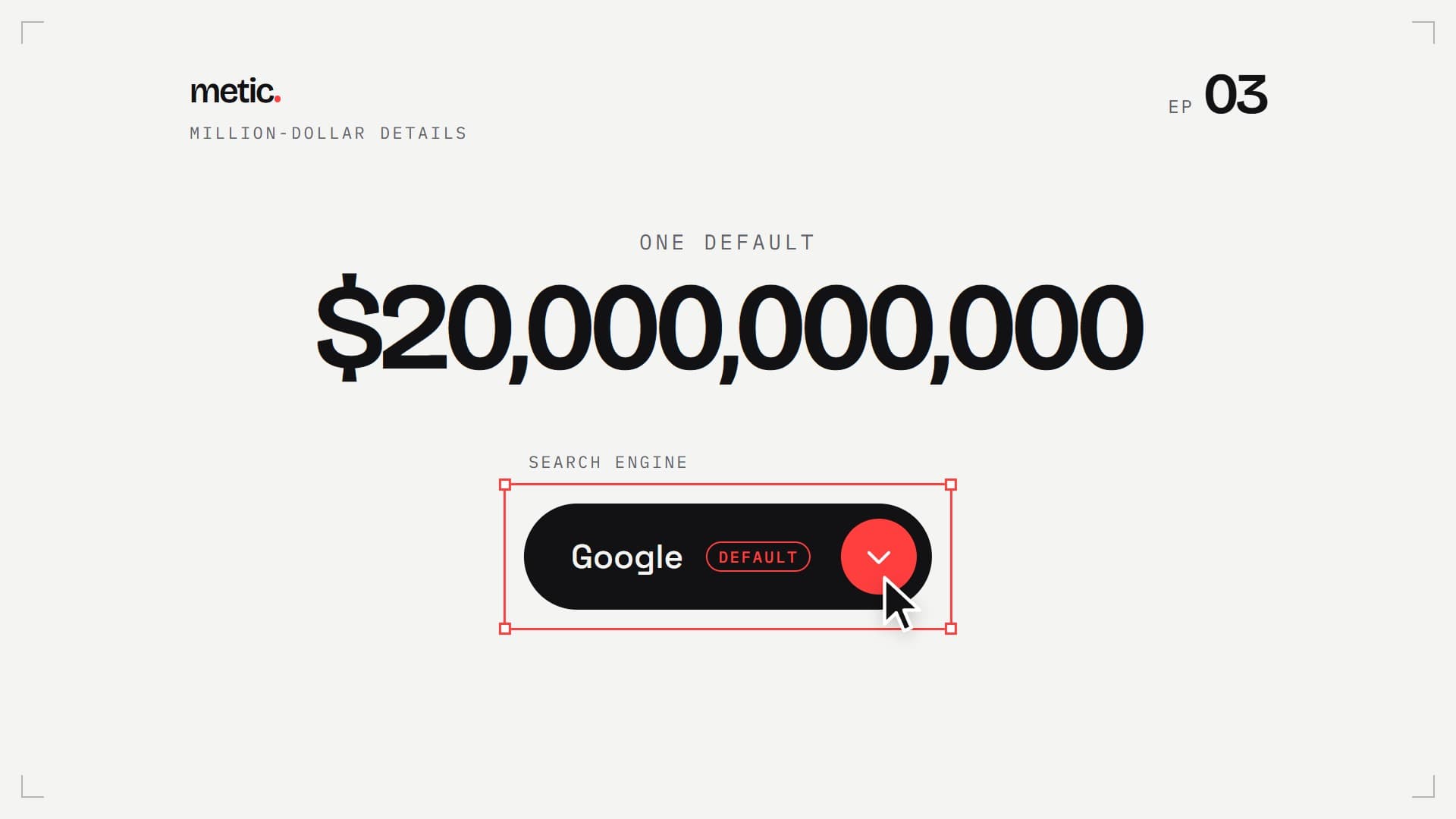
The $20 billion default
In 2022, Google paid Apple about $20 billion for one preselected option. Here is a dropdown that shows its default loud and clear: live, with all nine details, ready to copy.
01
Try it
Open it, point at the options, pick one. On the left the browser default, on the right the one from the reel.
default <select>
nine details later
Fully custom in Chrome and Edge 135+ and Safari 27+. Other browsers show the same pill with their own list.
02
The select, ready to copy
Plain HTML and CSS, no JavaScript. Every detail from the reel is marked in the CSS.
<!-- Select with a default · metic.studio · Million-Dollar Details EP 03 -->
<!-- Fully custom in Chrome/Edge 135+ and Safari 27+ (appearance: base-select).
     Other browsers keep the pill with the system list. No JavaScript. -->
<div class="pick">
  <label class="pick__label" for="engine">Search engine</label>
  <select class="pick__select" id="engine" name="engine">
    <button><selectedcontent></selectedcontent></button>
    <option value="google" selected><span class="pick__name">Google</span> <span class="pick__tag">default</span></option>
    <option value="bing"><span class="pick__name">Bing</span></option>
    <option value="duckduckgo"><span class="pick__name">DuckDuckGo</span></option>
    <option value="ecosia"><span class="pick__name">Ecosia</span></option>
    <option value="yahoo"><span class="pick__name">Yahoo</span></option>
    <hr class="pick__hl">
  </select>
</div>

<style>
  .pick {
    --ink: #121214; --paper: #f4f4f2; --surface: #fff; --steel: #62626a; --accent: #ff3e3e;
    --line: rgb(18 18 20 / .12); --hl: rgb(18 18 20 / .07);
    --lens: cubic-bezier(.23, 1, .32, 1); --spring: cubic-bezier(.34, 1.56, .64, 1);
    display: inline-grid; gap: 10px; justify-items: start; font: 500 15px/1.2 system-ui, sans-serif;
  }
  .pick__label { font: 12px ui-monospace, monospace; letter-spacing: .14em; text-transform: uppercase; color: var(--steel); }

  /* 1 · Unlock: one line, and the select is yours (Chrome/Edge 135+, Safari 27+) */
  .pick__select, .pick__select::picker(select) { appearance: base-select; }

  /* 2–4 · Size, shape, type (the fallback pill uses these too) */
  .pick__select {
    min-height: 52px; padding: 0 8px 0 24px; border: 0; border-radius: 999px; box-sizing: border-box;
    background: var(--ink); color: var(--paper); font: inherit; cursor: pointer;
    display: inline-flex; align-items: center; gap: 14px;
  }
  .pick__select:focus-visible { outline: 2px solid var(--accent); outline-offset: 3px; }
  .pick__select > button { all: unset; display: inline-flex; align-items: center; }
  .pick__select selectedcontent { display: inline-flex; align-items: center; gap: 12px; }

  /* 5 · Default: say it out loud, and one red dot */
  .pick__tag { font: 11px/1 ui-monospace, monospace; letter-spacing: .12em; text-transform: uppercase; color: var(--steel); }
  .pick__select selectedcontent .pick__tag { color: var(--accent); border: 1px solid var(--accent); border-radius: 999px; padding: 4px 8px 3px; }
  .pick__select::picker-icon {
    content: ''; width: 36px; height: 36px; border-radius: 50%; background: var(--accent) var(--caret) center / 14px no-repeat;
    transition: rotate .45s var(--spring);
    --caret: url("data:image/svg+xml,%3Csvg xmlns='http://www.w3.org/2000/svg' viewBox='0 0 256 256'%3E%3Cpath fill='%23fff' d='M216.49 104.49l-80 80a12 12 0 0 1-17 0l-80-80a12 12 0 0 1 17-17L128 159l71.51-71.52a12 12 0 0 1 17 17Z'/%3E%3C/svg%3E");
  }

  /* 6 · Open: the list unfolds from the button */
  .pick__select:open::picker-icon { rotate: 180deg; }
  .pick__select::picker(select) {
    margin-block: 8px; padding: 6px; border: 1px solid var(--line); border-radius: 16px;
    background: var(--surface); color: var(--ink); box-shadow: 0 24px 48px -24px rgb(0 0 0 / .35);
    opacity: 0; clip-path: inset(0 0 100% 0 round 16px);
    transition: clip-path .45s var(--lens), opacity .15s, display .45s allow-discrete, overlay .45s allow-discrete;
  }
  .pick__select:open::picker(select) { opacity: 1; clip-path: inset(-24px -24px -56px -24px); }
  @starting-style { .pick__select:open::picker(select) { opacity: 0; clip-path: inset(0 0 100% 0 round 16px); } }

  /* 7 · Highlight: one pill slides to whatever you point at */
  .pick__select option {
    position: relative; z-index: 1; display: flex; align-items: center; gap: 12px; min-height: 44px; padding: 0 12px 0 14px;
    border-radius: 10px; background: none; outline: none;
  }
  .pick__select option:checked, .pick__select option:hover, .pick__select option:focus-visible { anchor-name: --pick-hl; }
  .pick__select:has(option:hover) option:checked:not(:hover) { anchor-name: none; }
  .pick__hl {
    position: absolute; z-index: 0; margin: 0; border: 0; border-radius: 10px; background: var(--hl);
    position-anchor: --pick-hl; top: anchor(top); left: anchor(left); width: anchor-size(width); height: anchor-size(height);
    transition: top .4s var(--spring);
  }

  /* 8 · Check: the checkmark draws itself */
  .pick__select option::checkmark {
    order: 1; margin-left: auto; content: ''; width: 18px; height: 18px;
    background: url("data:image/svg+xml,%3Csvg xmlns='http://www.w3.org/2000/svg' viewBox='0 0 24 24'%3E%3Cpath d='M4 12.5l5 5L20 6.5' fill='none' stroke='%23ff3e3e' stroke-width='3' stroke-linecap='round' stroke-linejoin='round'/%3E%3C/svg%3E") center / contain no-repeat;
  }
  .pick__select option:checked::checkmark { animation: pick-draw .45s var(--lens) .1s both; }
  @keyframes pick-draw { from { clip-path: inset(0 100% 0 0); } to { clip-path: inset(0); } }

  /* 9 · Pick: your choice slides into the button */
  .pick__select selectedcontent > * { animation: pick-home .45s var(--lens) both; }
  @keyframes pick-home { from { opacity: 0; translate: 0 60%; } }

  /* Older browsers: same pill, system list */
  @supports not (appearance: base-select) {
    .pick__select {
      appearance: none; padding-right: 52px;
      background: var(--ink) url("data:image/svg+xml,%3Csvg xmlns='http://www.w3.org/2000/svg' viewBox='0 0 36 36'%3E%3Ccircle cx='18' cy='18' r='18' fill='%23ff3e3e'/%3E%3Cpath d='M12.5 15.5l5.5 5.5 5.5-5.5' fill='none' stroke='%23fff' stroke-width='2.5' stroke-linecap='round' stroke-linejoin='round'/%3E%3C/svg%3E") right 8px center / 36px no-repeat;
    }
    .pick__select option { color: #121214; background: #fff; }
  }
  @media (prefers-reduced-motion: reduce) {
    .pick *, .pick *::before, .pick *::after, .pick__select::picker(select), .pick__select::picker-icon { transition-duration: .01ms !important; animation-duration: .01ms !important; }
  }
</style>
What happened
Every iPhone and Mac comes with Safari, and Safari comes with a search engine already selected. Court documents in the US government’s antitrust case against Google showed what that one preselected option is worth: in 2022, Google paid Apple about $20 billion to be Safari’s default search engine.
Why so much for a setting anyone can change in a few taps? Because almost nobody does. When UX researcher Jared Spool collected the settings files of several hundred Microsoft Word users, fewer than 5% had changed a single option. Several told him they assumed Microsoft had a good reason for the defaults.
What that means for your forms
Whatever you preselect is what most people end up with. So choose defaults on purpose, and make them visible: a default people can see is a default they can trust, or change.
The nine details
- Unlock: appearance: base-select. One line, and the select is yours.
- Size: 52 px tall, comfortably above the 44 px minimum.
- Shape: a full pill.
- Type: a real font instead of the system default.
- Default: the preselected option says so, and one red dot shows where to click.
- Open: the list unfolds from the button, the arrow turns.
- Highlight: one pill slides to whatever you point at.
- Check: the checkmark draws itself.
- Pick: your choice slides into the button.
Still a real <select>
No JavaScript, no div pretending to be a dropdown. Keyboard, screen readers and forms work like with any select. It is fully custom in Chrome and Edge from version 135 and in Safari from version 27. Firefox and older browsers show the same pill with their own list.
Sources
Want details like this on your website?